Download
Version 0.1.3, released 27 October 2026. Free, with no account. You need a disc image of your own US copy of The Getaway (SCUS-97133) to play the story.
Optional
The launcher
The Second Coat launcher installs the game for you, keeps it up to date and repairs damaged files. It installs mods from the mods page, the recommended ones in one go, and imports your HD texture pack. It updates itself too.
Rather do it yourself? The downloads below are the same game, to unpack anywhere.
On a Steam Deck? One file puts the launcher and the game in your Steam library, to play in Gaming Mode.
Windows
Windows 10 or 11, 64-bit
The installer is not code-signed yet, so Windows may warn about an unknown publisher: choose More info › Run anyway.
Linux
x86-64 with glibc 2.35 or newer (Ubuntu 22.04, Debian 12 and later)
Make the AppImage executable and start it; it updates itself. The .deb installs it system-wide, but does not update itself.
macOS
macOS 11 or newer, Apple silicon or Intel
Not notarised, so macOS refuses it the first time: allow it under System Settings › Privacy & Security › Open Anyway. Not tested on a Mac yet.
Launcher 1.0.2
Windows
Game
Download 77 MBWith the Beta cars and Cheats mods on, Strand hair to turn on, and the HD textures mod ready for your pack.
getaway-windows-x86_64.zip
SHA-256 55745df0a05397d65491fa19c9e930df9a86693c13dfd5df8042719fc203522c
Full
Download 1.0 GBThe game and its mods, plus generated materials (PBR maps for the HD textures), London ground cover and MakeHuman characters. A larger download.
getaway-windows-x86_64-materials.zip
SHA-256 c4ef02ac5b5e7dcc769ca35d5ebbacf5b9066377635372f771638abeb3a94711
Needs
- Windows 10 or 11, 64-bit
- A GPU with a Vulkan 1.2 driver
Getting started
- Unzip the archive anywhere.
- Put your disc image next to the game as game.iso, or point iso_path in config/settings.ron at it.
- For HD textures, open the mod manager (getaway-mod-manager) and choose Tools › HD texture pack (PCSX2)…
- Start getaway.exe.
Linux
Game
Download 75 MBWith the Beta cars and Cheats mods on, Strand hair to turn on, and the HD textures mod ready for your pack.
getaway-linux-x86_64.tar.gz
SHA-256 81b68950e27681383d22eaa8f3f5ba07b998d858e6e32dc8ba644401e41be3ef
Full
Download 1.0 GBThe game and its mods, plus generated materials (PBR maps for the HD textures), London ground cover and MakeHuman characters. A larger download.
getaway-linux-x86_64-materials.tar.gz
SHA-256 69ac3990b3c8f202e1fc02acf6f095b4d477698b04f8f1596242ff39eb1fa3c8
Needs
- x86-64 with glibc 2.35 or newer (Ubuntu 22.04, Debian 12 and later)
- A GPU with a Vulkan 1.2 driver
Getting started
- Unpack the archive anywhere.
- Put your disc image next to the game as game.iso, or point iso_path in config/settings.ron at it.
- For HD textures, open the mod manager (getaway-mod-manager) and choose Tools › HD texture pack (PCSX2)…
- Run ./getaway.sh.
macOS
Game
Download 109 MBWith the Beta cars and Cheats mods on, Strand hair to turn on, and the HD textures mod ready for your pack.
getaway-macos-universal.zip
SHA-256 ac7b2abeb33799db656a946673661cf79e4c7aac565441381a01b273c1b44913
Not tested on a Mac yet: we have no Mac hardware to run it on. It is built the same way as the other platforms, but if it does not start, please report it.
Needs
- macOS 12 or newer
- Apple silicon or Intel (Vulkan through MoltenVK, which the app carries)
Getting started
- Unzip the archive and move Getaway.app where you like, such as Applications.
- Open it. It is not notarised, so macOS refuses it the first time: allow it under System Settings › Privacy & Security › Open Anyway.
- The main menu asks for your disc image. Settings, mods and saves live in ~/Library/Application Support/getaway-remaster/.
Not on macOS yet
- The mod manager, and with it the HD texture import, is not in the macOS package yet.
- No full package with the large mods yet.
Android
getaway-android-arm64.apk
Needs
- Android 11 or newer, 64-bit ARM
- A GPU with a Vulkan 1.1 driver
- Tested on a Mali-G52 tablet with 2.5 GB of RAM
Getting started
- Install the APK (allow installs from your browser or file manager).
- Copy your disc image into the app’s folder.
- Start the game. Touch controls are on screen; a gamepad works too.
Not on Android yet
- Hosting a multiplayer game needs a desktop or a dedicated server; joining works.
iOS
getaway-ios.ipa
Needs
- Tested on an iPhone 14 Pro Max
- A way to sideload an IPA, such as AltStore or SideStore
Getting started
- Sideload the IPA.
- Copy your disc image into the app’s folder with the Files app.
- Start the game.
Not on iOS yet
- Mods’ WebAssembly plugins do not run (iOS allows no code generated at run time); Luau scripts, textures, models and sounds do.
- No hosting; joining a multiplayer game works.
HD textures and the first start
HD textures come from the mod manager
The HD texture pack is not in the download: it is the community's upscale of the game's own textures, which we may not hand out. The mod manager next to the game, getaway-mod-manager, brings in your copy. If you want HD textures, open it and choose Tools › HD texture pack (PCSX2)… It finds the pack PCSX2 already has, imports a folder or a.zip you downloaded, and links to the pack's download page. The pack goes on as the first mod, with the full package's generated materials after it.
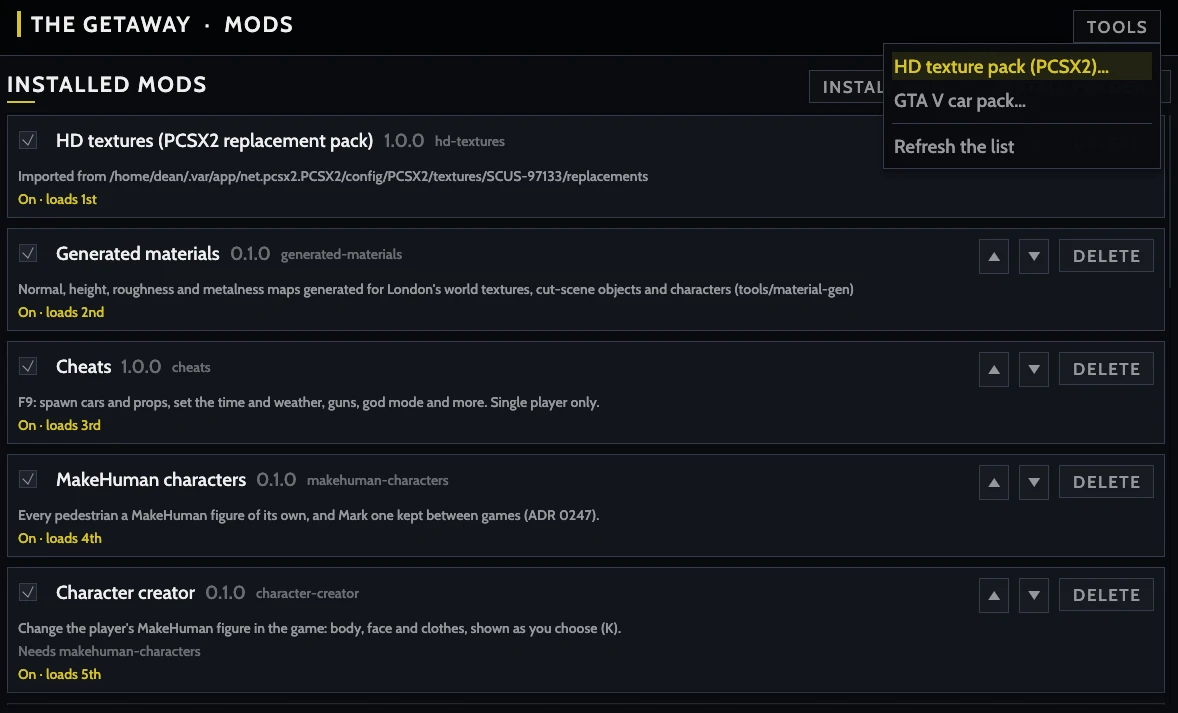
The mod manager also turns mods on and off, sets their order and installs new ones from a .zip or a folder. On the command line, getaway-mods import-pcsx2 <replacements folder> imports the pack too; see Mods.
The first start takes a while
The first start sets the graphics for your PC: the main menu offers a short benchmark that picks the settings your GPU runs smoothly, and Options › Display › Graphics benchmark runs it again later.
Before the world loads, the game converts its textures, and the HD pack's when it is on, into a cache on your drive. That can take several minutes, longer with the HD pack; later starts skip it.
Without a disc image the game opens a test scene in free roam, so you can check that your GPU runs it before you dump your disc.